"blackiecats, post: 48175" said:
My only problem is, it seems a little restrictive that it will only allow shoppers to buy ThunderCats items... :( What if a guy wants to pick up some ThunderCats toys and a book for his wife in the same transaction? You could lose potential non related item sales with this! When folks ordered the ThunderCats book, the odd couple of folks ordered other non related items too!
However it looks great! How would we incorporate this into the site?
I do agree with the restrictive issue. It could be placed as a link on the main page where the other links on the nav bar are.
Here is a run down on how it could be done...obviously I would be providing the appropriate link. Im not sure how to do the actual embed to the main site but maybe this is worth looking at
Embed [B]your aStore using an inline frame [/B]
An
http://www.w3.org/TR/html4/present/frames.html#h-16.5"" rel="noopener noreferrer" target="_blank">inline frame is a great way to embed your aStore into any existing or new page on your Web site. This method of embedding your aStore will appear to your visitors as if the aStore is part of your site and enable them to shop without leaving your site.
[LIST=1]
[*]Create a new page or select the existing page on your site into which you would like to embed your aStore.
[*]Select
Embed your aStore using an inline frame in the above Get Link form.
[*]Click the Highlight HTML button and copy the selected code.
[*]Then paste the code into the HTML of the page you selected in step 2.
[*]Add a "Store" link to your site's main navigation that links to the page containing your aStore.
[/LIST]
 Integrate [B]your aStore using a frameset
 [/B]
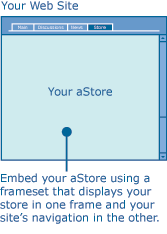
Frame your aStore into your Web site using a
http://www.w3.org/TR/html4/present/frames.html"" rel="noopener noreferrer" target="_blank">frameset by placing your aStore in one frame and your Web site's navigation in another frame. This method of embedding your aStore will also appear to your visitors as if the aStore is part of your Web site and enable them to shop without leaving your site.
[LIST=1]
[*]Select
Integrate your aStore using a frameset in the above form to view sample frameset code with you store's URL already placed into one of the frames.
[*]Create a new frameset page using the code sample provided above or any custom frameset that better fits the structure of your Web site.
[*]Place your site's navigation in one of the frames and your aStore URL in another frame.
[*]Add a "Store" link to your site's main navigation and link it to the new frameset you just created.
[/LIST]